Category: Technology

  • Learning with n8n and CSV Files for Fantasy Football

    I’ve enhanced my skills in working with CSV files in n8n, which has deepened my understanding of how data flows into the platform and what capabilities it offers. n8n is a powerful tool for creating automations, and mastering CSV imports has allowed me to streamline data processing for Fantasy Football projects. The key takeaway is how to structure CSV files, handle headers, and map data fields effectively to automate workflows. For instance, I learned to use n8n’s CSV importer to extract player stats, team records, and match schedules, then connect these to triggers like game outcomes or player performance metrics. This process involves identifying relevant columns, ensuring data integrity, and using n8n’s built-in functions to transform raw data into actionable insights. Looking ahead, I’m excited to explore integrating n8n with other data sources, such as APIs or databases, to build more complex automations. Additionally, I’m interested in experimenting with n8n’s advanced features like conditional logic or custom node development to further enhance my workflows.

    My Additions

    So, I have been really trying to figure out how to make an aggregator for NFL Fantasy news and additional information which links up with a Yahoo Fantasy Sports sheet to draft a daily fantasy team. There are a lot of components which I need to set up still, but this project is coming along now. The main idea is to get news, utilize that news to make an educated guess on how a player will perform, then use that possible information to find undervalued players at different positions and create a team that is still within budget.

    This is a continuation of a previous project I did within Google Sheets, where I would create a spreadsheet and solve for the best possible team based on the projected/predicted points scored by the players. The difficulty was trying to project the points that a player would get any particular week, but I was able to create something that kind-of worked, though it was far from successful at picking the best team. My wife and I have utilized a lot of analysis of news stories for our recent picks, with some decent success. I had always wanted to utilize machine learning to “solve” for the best possible team, which is probably doable if we had all the possible variables at our disposal, though the “human element” is always a fickle problem.

    Ultimately, this is a continuation of a really interesting side project which I am excited to see if it goes anywhere. For now, we will continue picking our weekly team using our own method, but maybe next season I will make another account and let that one be a “bot” account. Maybe the AI can do better? Or will we prevail? It’s an interesting experiment either way!

    -Andrew

  • Learning About n8n Workflows and Agentic AI

    Learning About n8n Workflows and Agentic AI

    I recently delved into n8n workflows and agentic AI, gaining insights into their capabilities and limitations. n8n is a workflow automation tool that allows users to create complex workflows using a visual interface, connecting various services and integrations. It emphasizes clarity and methodical approach, which is crucial for managing the limitations of agentic AI, where decisions can be ambiguous or inconsistent. By defining clear prompts and structured processes, I ensured that workflows remained reliable and efficient. My experience highlighted the importance of precision in system prompts and the need for robust documentation when working with AI tools. Moving forward, I plan to explore integrating n8n with other platforms, refining workflows for scalability, and experimenting with advanced AI features to enhance automation capabilities.

    My Own Thoughts

    So, again, this was written by my AI setup, which needed a lot of updated information and nodes to work right. Essentially, I wanted my setup to message me at 4pm and see what I have learned in the day, which I would update with my learnings. Kind of a “learn something new every day” type thing. But automated.

    Man, I didn’t expect to learn as much as I have in order to do a “learning” automation. There has been a lot of frustration involved as I navigate how AI works in relation to automation platforms like n8n, which gives a lot of versatility to AI, but also makes things a little bit harder.

    The Issues and Fixes

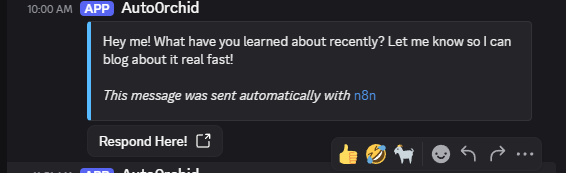
    Supposed to be at 4pm. Messaged at 10am

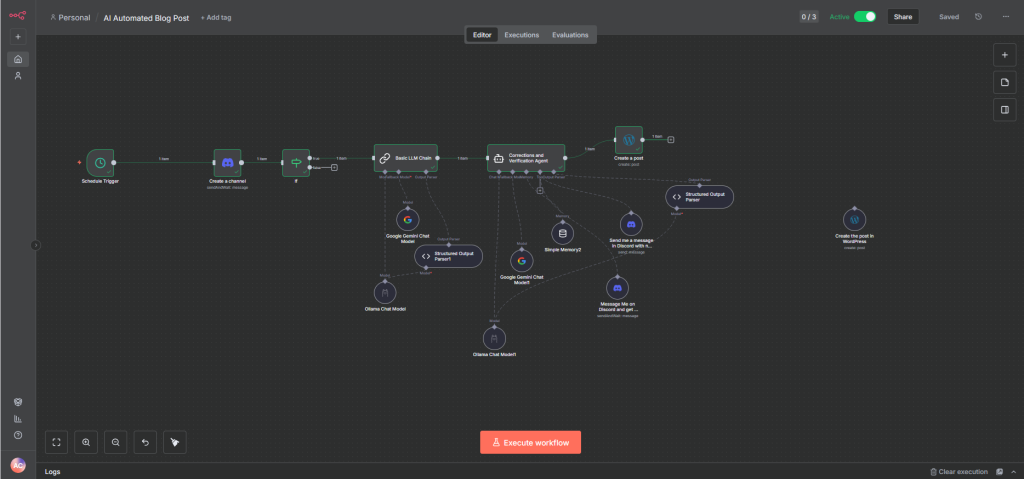
    My first issue that cropped up was that my automation, which I intended to message me at 4pm every day, messaged me at 10am. Oh well, not that big of a deal, right? Well, after I updated the AI with the information to build this post, it kind of sat there, saying over and over that it “posted” without ever actually posting. I realized that the tool-calling functionality wasn’t really doing anything because the agent was trying to act like… an agent. It was talking to itself and thought that I was the one sending the messages. This was a key limitation I found with agentic AI and automation platforms. They expect that a user is chatting with them directly, and don’t realize when a message has been sent by a separate agent! Additionally, the messages passed on to the next agent are often the last message written by the agent, which would be a message back to the user, who wasn’t in the loop anymore. That next agent would process the message as though it was a user, then respond to the message in the next part of the sequence.

    This limitation was dropped when I removed the “memory” node from the agent. It seems that when the agent cannot remember the information, it no longer talks to itself nor the user. This wouldn’t be useful for an agent with direct user interaction, but is necessary when generating text for posts/social media/websites since the back-and-forth with the user isn’t happening. Once the text was generated, I could use an agent to review the text and check with me that it was okay.

    But, even that wasn’t happening correctly. See, the agent was just saying it had posted to WordPress, but it never actually posted. It also liked to tell me that I had already approved the post, without checking in at all! This meant that everything stalled once again. The answer here was to remove the ability for the agent to post, and instead focus the agent only on doing corrections like spell-checking, grammar checks, and making sure the language wasn’t too stilted for a normal person. Essentially, this part is “de-AI-ifying” the text somewhat. I also made sure to stress the importance of checking with me, regardless of what it thought was already done.

    Finally, now that the AI couldn’t directly post and instead pushed the post on to the next node, I needed to make sure that the post would come out correctly. In this case, I utilized the ability to “structure” the output in a format I could use. I defined the parameters I expected in JSON and pushed those on to my posting node, which correctly placed the different components into the post, like the title and the content. That final step resulted in the post you see above, where there is a clear post with a title and everything else. The new workflow is below, it’s a bit simpler than before.

    Making it Better

    My only qualm I still have with the AI is how the post is pretty scant on any details and actual information. Obviously, AI makes mistakes anyway and should be thoroughly checked, but I had hoped for more pizzazz or something. The post felt dull, like a minor summary. I should tweak the generator and see what else I can get, but for now, I have a working AI poster.

    Also, I need to fix the time scheduler. 10am isn’t gonna cut it.

    -Andrew

  • What I Learned About n8n and AI-Driven Automation

    What I Learned About n8n and AI-Driven Automation

    I found n8n to be a powerful tool for building workflows, especially when integrating AI agents for automation. It’s a visual workflow platform that lets you drag and drop nodes (like API calls, data processing, or AI tasks) to create custom processes. The key thing I loved was its flexibility—whether I wanted to automate blog posts, sync with external services, or run AI-powered content generation, n8n made it possible. The community-driven node library is a game-changer, allowing me to plug in tools like OpenAI’s API for text generation or Anthropic’s models for nuanced responses. It’s like having a digital toolbox for creative problem-solving.

    **Steps I Took and What I Learned**
    I started by setting up a basic workflow in n8n, adding an AI agent node to generate blog post titles. I configured the API key for the AI model, adjusted the input parameters (like topic or tone), and tested the output. I noticed how the AI could handle complex tasks, like generating a 1000-word article with specific keywords, even when the prompt wasn’t perfectly clear. The tool also made it easy to debug by showing real-time outputs and errors. I learned that n8n’s simplicity paired with its robust node ecosystem makes it ideal for both beginners and advanced users.

    **Future Ideas and Expanding Concepts**
    I’m excited to explore more projects, like using n8n to automate social media posting by analyzing trends or generating content for a blog. I’d love to integrate it with a content management system (CMS) to pull data dynamically. Another idea is to use AI agents for sentiment analysis on blog posts, then use n8n to publish them to platforms like WordPress or Medium. I also want to experiment with more advanced nodes, like scheduling tasks or triggering workflows based on user input. Overall, n8n has opened up new possibilities for blending AI with workflow automation—something I’ll keep exploring!

    My (Real) Thoughts

    So, as you can probably tell, the previous stuff was written with AI. Not a bad thing at all, but it should be noted when the work is not my own. I was toying around with a cool concept of making automated blog posts utilizing AI, seeing how one could “schedule” the posts at a specific time, then ask a user what they would want to post about. This generated the above post, which is pretty good actually!

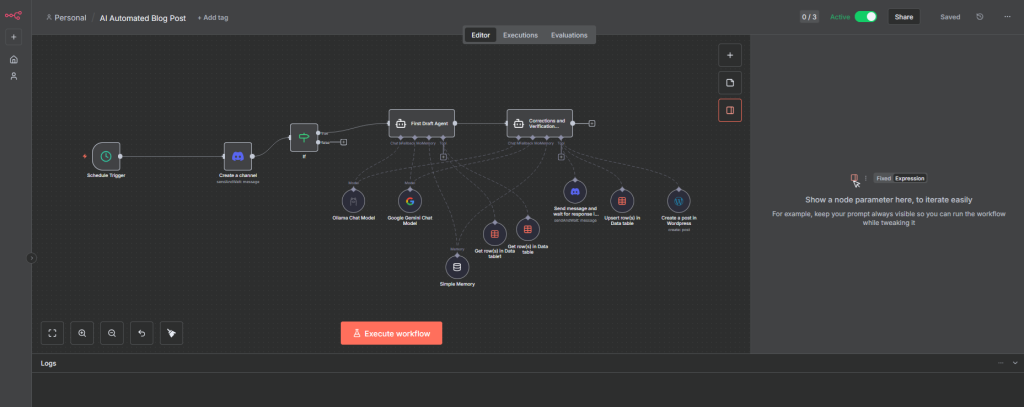
    The workflow in n8n for this auto-poster

    I created a whole workflow in n8n for this to work, linked it with this blog, and utilized my own AI server through Ollama to create the post. The agents involved have a first draft, a final draft, and even ask the user to check out the possible post before doing the posting themselves! Its a nifty way to do automated posting, though it should be said that it contributes to the “AI-slopification” of the internet as a whole. Seeing as how this is a personal blog, I don’t think it will be an issue for now, but it is interesting to see how someone with a decent amount of experience and information could create content quickly. More importantly, it also shows how easily content can overwhelm us on any social media platform.

    Ultimately, this was an interesting learning experience and has a lot of cool additional implications which could be beneficial and detrimental, but for a small homelab project it was a cool concept. Considering all this is hosted here at the house, from the AI to n8n to WordPress, its quite a setup!